
Manual Challenge Verification
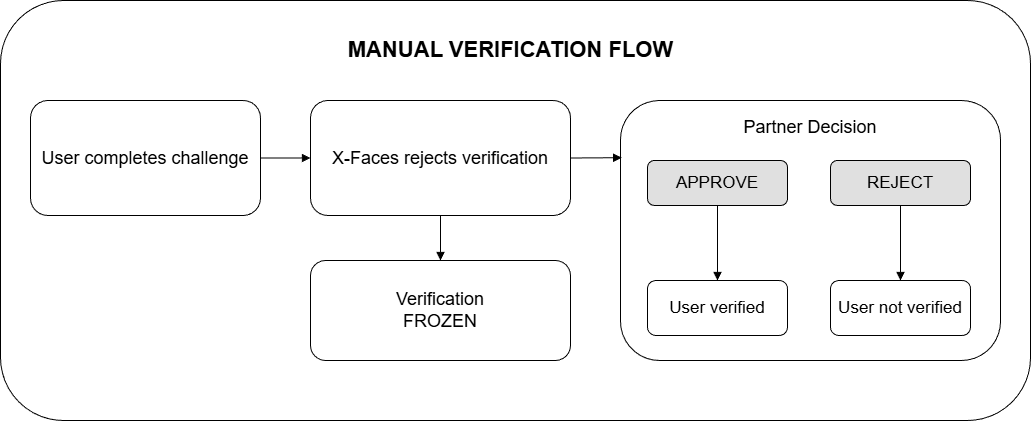
The Manual Challenge Verification feature allows you to manually verify or reject challenges that were automatically rejected by X-Faces. When enabled, failed challenges are sent to you via callback, giving you the opportunity to override the automatic decision.
This feature is useful when:
- You want to review failed verifications before final rejection
- Your business logic allows for manual approval of edge cases
How It Works
Section titled “How It Works”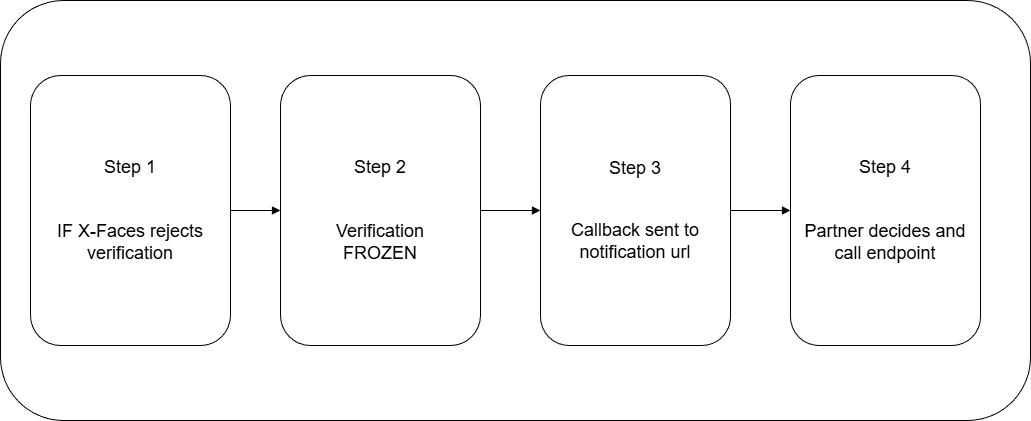
-
When a challenge is completed and automatically rejected by X-Faces, the verification is frozen — X-Faces has made its decision, but the final result is paused pending your confirmation. During this time, the user cannot start new challenges until the current one is resolved. A callback is sent to your
notification_url. -
You review the challenge data and call the verification endpoint to approve or reject the challenge
-
Once you make your decision (or the timeout expires), the verification is finalized and the user can proceed with new challenges
-
If no action is taken within the timeout period (default: 24 hours), the challenge remains rejected automatically
Important: Successfully verified challenges are NOT affected by this feature. They are processed normally and sent to you via callback.
Enable the Feature
Section titled “Enable the Feature”To enable Manual Challenge Verification, add the following to your project settings:
{ "partner_check": { "enabled": true, "autoreject_hours": 24 }}How to configure
Section titled “How to configure”See Project Settings Features for instructions on how to access and modify project settings.
Callback Notification
Section titled “Callback Notification”When a challenge is rejected and the feature is enabled, you will receive a standard callback to your notification_url with verified: false. The callback format remains unchanged — see Notification from X-Faces for details.
So, you can decide to manually verify or reject this challenge.
Verification API
Section titled “Verification API”Endpoint
Section titled “Endpoint”POST https://api.x-faces.xyz/v1/challenge/manual/verify
Authentication
Section titled “Authentication”Include your API token in the request headers:
token: your-api-tokenRequest Body
Section titled “Request Body”{ "challenge_uuid": "550e8400-e29b-41d4-a716-446655440000", "challenge_verified": true}Response
Section titled “Response”Success:
{ "result": true}Error responses:
{"result": false, "message": "Invalid API token"}{"result": false, "message": "No payload sent"}{"result": false, "message": "Invalid payload"}{"result": false, "message": "No challenges found"}Verification Results
Section titled “Verification Results”When challenge_verified: true
Section titled “When challenge_verified: true”- All rejection reasons are removed from the challenge
- Approval reason
Manualis added - User verification status is set to
verified: true
When challenge_verified: false
Section titled “When challenge_verified: false”- Rejection reason
rejectedByPartneris added to the challenge - User verification status remains
verified: false
Timeout Behavior
Section titled “Timeout Behavior”If you do not call the verification endpoint within the configured autoreject_hours:
- The challenge remains rejected
You can still call the verification endpoint after the timeout to change the verification status if needed.
Important Notes
Section titled “Important Notes”- This feature only affects failed challenges. Successfully verified challenges are not affected.
- You can call the verification endpoint at any time, even after the timeout.
- Each call to the endpoint updates the user’s verification status immediately.
- The verification endpoint only works for challenges that belong to your project (validated by API token).