
Expected Workflow on a Partner Side
REST API for bank cards recognition
Section titled “REST API for bank cards recognition”Schematic representation of the REST API call sequence
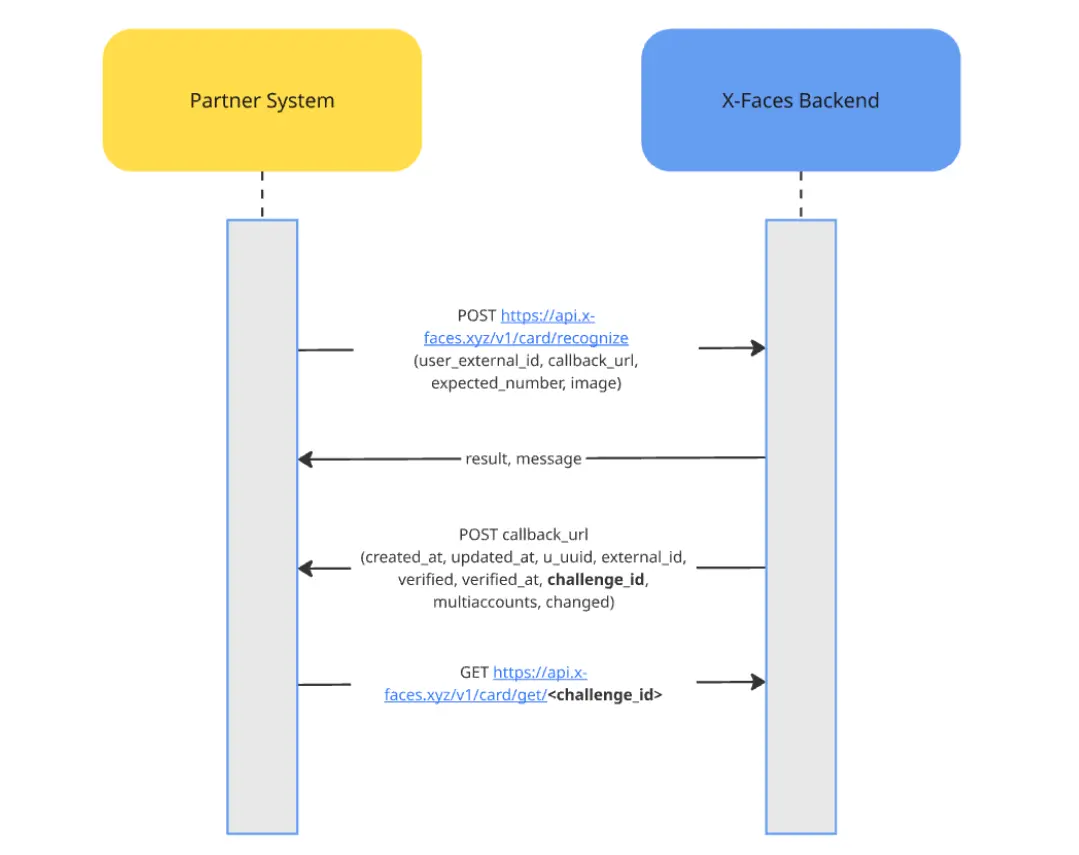
💡 Note: This API provides an endpoint to POST the payload for bank card recognition. It does NOT return the result of the recognition, only whether or not the recognition process has started successfully.
Bank Card Recognition – Full API Flow
Section titled “Bank Card Recognition – Full API Flow”This describes the expected interaction between a Partner System and the X-Faces backend for processing bank card recognition requests.
Step 1: Initiate Recognition
Section titled “Step 1: Initiate Recognition”Endpoint:
POST https://api.x-faces.xyz/v1/card/recognizeRequest Body Parameters:
{ "user_external_id": "string", "callback_url": "https://your-system.com/notify", "expected_number": "string (optional)", "name": "Full Cardholder Name (optional)", "image": "base64-encoded image data" | ["base64-encoded image data", "..."]}user_external_id: ID of the user in the partner system.callback_url: URL to which X-Faces will send the recognition result.expected_number: (Optional) Expected card number for validation.name: (Optional) Full cardholder name used for verification when selected by the name-source priority rules.image: Base64 image of the card to be recognized, or a list of Base64 images.
Cardholder name source priority:
- For a verified user, X-Faces first uses the identity document name stored in its database and falls back to the partner-provided
namewhen the document name is unavailable. - For an unverified user, X-Faces first uses the partner-provided
nameand falls back to an available identity document name whennamewas not supplied. - If neither source nor a recognized
cardholderis available, no automatic name verification decision is made.
The names are normalized and compared using fuzzy matching. The detailed recognition result includes expected_name when the partner-provided value was used.
Response:
{ "result": True | False, "message": No message if True | Error message}⚠️ Note: This response does not contain the recognition result — only the status of request acceptance.
Step 2: Receive Callback
Section titled “Step 2: Receive Callback”Once recognition is complete, X-Faces will send a POST request to the specified callback_url.
Callback Payload Example:
{ "created_at": "timestamp", "updated_at": "timestamp", "u_uuid": "user_uuid", "external_id": "user_external_id", "verified": true, "verified_at": "timestamp", "challenge_id": "challenge_identifier", "multiaccounts": false, "changed": false}Step 3: Get Recognition Result (Optional)
Section titled “Step 3: Get Recognition Result (Optional)”Endpoint:
GET https://api.x-faces.xyz/v1/card/get/<challenge_id>Use the challenge_id received in the callback to query the detailed recognition result if needed.
Summary
Section titled “Summary”- Partner sends the recognition request with card image and optional expected card number and cardholder name.
- X-Faces accepts and processes the recognition.
- Once complete, the result is sent to the provided
callback_url. - The partner can optionally use
challenge_idto fetch details.